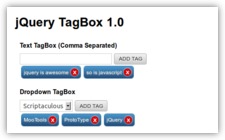
 A jQuery based Tag Input plugin.

After a long time we are back with another jQuery Plugin. This is a jQuery plugin to help add tags like input in your forms.
Demo: Click Here
Download: Click Here
Project Repository: Click Here
Usage:
- In the header section add the following:
- Add your form elements like this:
Advanced Options:
- “separator” – This can be used to define the separator to be used to delimit the tags (Default: ‘,’)
- “className” – Used to set the tag-box class name (Default: tagBox)
- “tagInputClassName” – Used to set the class name of the tag input box (Default: ”)
- “tagButtonClassName” – Used to set the class name of the tag button (Default: ”)
- “tagButtonTitle” – Defines the title of the “Add Tag” button (Default: ‘Add Tag’)
- “confirmRemoval” – Defines whether removal of tags requires confirmation dialog (Default: ‘false’)
- “confirmRemovalText” – The text in the confirmationRemoval dialog (Default: ‘Do you really want to remove the tag?’)
- “completeOnSeparator” – Defines whether tags are added when separator is input (Default: ‘true’)
- “completeOnBlur” – Defines whether to add the tags when we blur from the tag input (Default: ‘false’)
- “readonly” – Defines whether tag-box is readonly (Default: ‘false’)
New Options added in version 1.0.1
- “enableDropdown” – Used to enable drop-down selection in the tag inpu (Default: ‘false’)
- “dropdownSource” – Returns the source for the tag box drop-down selector could be a jQuery object or JSON of the form {“key”:”value”} (Default: function(){})
- “removeTagText” – Defines the text inside the remove tag link (Default: ‘X’)
- “maxTags” – Defines the maximum number of tags to be added (Default: ‘-1’ i.e. unlimited)
- “maxTagsErr” – Callback to display error message when maxTags are reached (Default: ‘function(max_tags) { alert(“A maximum of “+max_tags+” tags can be added!”); }’)
- “beforeTagAdd” – Callback executed before a tag is added (Default: ‘function(tag_to_add) {}’)
- “afterTagAdd” – Callback executed after a tag is added (Default: ‘function(added_tag) {}’)
If you liked the plugin do not forget to share it on facebook, rate it and retweet it.
98 replies on “jQuery TagBox Plugin”
Cool plug-in dude 🙂 I could definitely see some use for this. I just recently wrote my first plug-in as well. jQuery illuminate. Check it out here: http://www.tonylea.com/2011/jquery-illuminate/ . Very cool plug-in though. Good job.
Great plugin, have emailed you also. We have this on our dev area working a treat, it really “functionality wise” blows all other jQuery Taggers out of the water.
Escellent work
[…] | Download This is a jQuery plugin to help add tags like input in your […]
Excellent plugin. I was looking for something similar to this.
Is this plugin has the way to get all the added tags?
Hi Sridhar,
You can get all the tags like this:
jQuery(“#tb”).tagBox();
To get all the tags in #tb just call jQuery(“#tb”).val().split(‘,’);
Regards,
GT
Very nice. I used this together with the jquery-UI autocomplete; the code to do this looks like:
var tag_data = “one two three”.split(” “);
$(“#tag_list”).tagBox();
$(“.tagBox-input”).autocomplete({source: tag_data});
Hi Greg,
Do send a link to your implementation for others to follow.
Regards,
GeekTantra
r u have demo of autocomplete ?
First, thank you for this great plugin! Simple, elegant and easy for novices to use (as I deal with writers, not techies 🙂 )
I’ve successfully implemented jQuery UI Autocomplete with this plugin, but you do have to set it up the right way.
Basically, you assign jQuery UI’s autocomplete to the TagBox input class name (className) used to define the actual tag box. The plugin’s default is “.tagBox”, so if you’re using multiple instances of TagBox you must use unique class names. You also need to have unique selector names for each occurrence.
Make sure you successfully call jQuery UI in your script, of course.
EXAMPLE:
jQuery(“#tb1”).tagBox( {className: “tagBox-yourclassname”} );
jQuery(“#tb2”).tagBox( {className: “tagBox-anotherclassname”} );
Now you can call jQuery UI Autocomplete. on each specific tag box as shown below:
var yourTags = [];
jQuery( “.tagBox-yourclassname-input”).autocomplete({
source: yourTags,
// add all your other parameters here if nay
});
var newTags = [];
jQuery( “.tagBox-newclassname-input”).autocomplete({
source: newTags,
// add all your other parameters here if nay
});
The above shows how you could call the specific tags if you were using PHP . Your specific implementation will be different, but the principle is the same.
NOTE: VERY IMPORTANT – By using a distinct className other than the default “.tagBox”, you will need to edit your TagBox style sheet to provide the right class definitions for EACH className. I’d suggest you make a copy of the default TagBox CSS file and edit that one, and then embed that new file.
Hope this proves helpful. 🙂
[…] 39. jQuery TagBox […]
[…] 39. jQuery TagBox […]
[…] 39. jQuery TagBox […]
[…] 39. jQuery TagBox […]
[…] 39. jQuery TagBox […]
[…] 39. jQuery TagBox […]
Hi, is it possible to store or save the tags using cookies or loacalstorage?
Yes you can store the tags using cookies or local storage. Just need to save the delimiter separated tags in the storage and retrieve whenever necessary.
[…] 39. jQuery TagBox […]
[…] 39. jQuery TagBox […]
I’m trying to use your plugin on a page that is dynamically created on the server. I need to have at least five instances of the tag box on the page.
I want to have one call that does the tagBox instead of a call for each tagBox instance. Seems that I can do that except for where I specify the dropdownSource. If I coulde specify the dropdown control on the field, I could do this. Anybody have any ideas how to do this? I’m very new to jQuery and am having issues with seeing how to do this. Thanks.
Hi,
Multiple instances should work completely fine with either drop-down or input-box. Could you provide a link to your implementation for me to check it out and suggest fixes.
Regards,
GeekTantra
Cool plugin.. just wondering how will i load default tags. I tried this it produce two tags but no text 🙁
Just set the value of your input field to the delimiter separated values. It should load them up as the default tags.
[…] cards: American Express, MasterCard, Visa, Diners Club, and Discover. Smart ValidateView the DemoTagBox TagBox is a jQuery plugin to help add tags like input in your forms. TagBoxView the DemoPower […]
[…] TagBox […]
[…] Небольшой плагин, добавляющий строку ввода тэгов и кнопку добавления […]
[…] desteklediği kartlar: American Express, MasterCard, Visa, Diners Club, and Discover. Kaynak DemoTagBox TagBox formlarınıza etiket eklemek için kullanabileceğiniz güzel bir eklenti. Kaynak DemoPower […]
[…] TagBox […]
[…] TagBox […]
[…] 39. jQuery TagBox […]
Beautiful JQuery Plugins
[…] 39. jQuery TagBox […]
Nice plugin – I’ve been looking for something like this for a while, to implement Flickr/Wordpress-style tag boxes. One thing I can’t figure, though – how can I pass values as JSON to the plugin, so that existing values are displayed as tagboxes? For instance, if I’ve a tags input box, I’d like existing tags, retrieved via a database query, to appear below the input box. The dropDownSource option is useful for, well, dropdowns, but is there similar for a text input?
Sorry if I’m missing something blindingly obvious 🙁
Fred
[…] 39. jQuery TagBox […]
[…] 39. jQuery TagBox […]
[…] TagBox ( Demo | Download ) TagBox is a jQuery plugin to assist put in tags like input in your forms. […]
[…] TagBox ( Demo | Download ) TagBox is a jQuery plugin to assist put in tags like input in your forms. […]
hi
i want to know how to update tags,
for example i add tags value in sql database and i want to get beck in a my update form,
same style like i added fist time, and i wont delete some tags and add some tags.
how can i update ?
thanks.
hoe to remove ‘tagButton’ / add tag button ?
[…] ( Demo | Download ) TagBox is a jQuery plugin to assist put in tags like input in your […]
[…] jQuery TagBox Plugin | GeekTantra “className” – Used to set the tag-box class name (Default: tagBox) “tagInputClassName” – Used to set the class name of the tag input box (Default: ”) “separator” – This can be used to define the separator to be used to delimit the tags (Default: ‘,’) […]
[…] TagBox ( demo | download ) TagBox é um plugin jQuery para ajudar colocar em tags como entrada em seus formulários. […]
[…] custom dropdowns. It also degrades gracefully for visitors on older browsers. DropKickDemo →TagBox Plugin TagBox is a jQuery plugin to help add tags like input in your forms. TagBox PluginDemo […]
[…] TagBox Plugin […]
Hello,
I really like your tagbox plugin. Works very well in my script. But the only thing is that i want to edit an item and show the tags.
I filled the input box with the comma seperated values. The tags show up as default. BUT when i have an selectbox with all the avaible tags filled up the default tags are empty. The scripts creates an instance for each tag but there is no text in them.
I tried to add the disabled=”disabled” state to the option values which are allready tags, but that won’t make a difference.
Do you have any idea?
Thanks in advance!
Hi Wouter,
‘I tried to add the disabled=”disabled” state to the option values which are allready tags, but that won’t make a difference. ‘ ==> you also need to make the first enable item as selected. Add following code in the end of ‘generate_tags_list()’ function
Code:
$tag_input_elem.find(‘option:enabled’).first().attr(“selected”, “selected”);
And for disable option values add following code after line 158 inside “jQuery.each(tags_list, function(key, val)” function
if($tag_input_elem.is(“select”))
$tag_input_elem.find(‘option[value=”‘+val+'”]’).attr(“disabled”, “disabled”);
}
Hope it help you!
[…] TagBox Plugin […]
[…] TagBox Plugin […]
[…] TagBox ( 演示 | 下载 ) […]
[…] passwords.Learn More | Demo DropKickCreate custom dropdowns with ease!Learn More | Demo TagBox PluginThis plugin helps add tags to input forms.Learn More | Demo Look for jQuery Plugins for […]
[…] jQuery TagBox Plugin […]
[…] Source Demo […]
[…] TagBox ( 演示 | 下载 ) […]
[…] TagBox Plugin […]
wow.. this is cool plugin.. I like it.. btw, it this working good in IE6?
[…] TagBox Plugin […]
very very nice ..
Thank you very much
very very nice .. because I’m looking for backlinks to raise my Rang
visit my web, http://produsenkostumbadut.com
Thank you very much
[…] | Download This is a jQuery plugin to help add tags like input in your […]
[…] 9) jQuery Tagbox Plugin […]
[…] | Download This is a jQuery plugin to help add tags like input in your […]
[…] TagBox ( 演示 | 下载 ) […]
[…] TagBox Plugin […]
i like your plugin!
how can i manually add tags in javascript?
I would like to know the same thing.
[…] 9) jQuery Tagbox Plugin […]
[…] 20- TagBox […]
very nice
[…] TagBox […]
[…] 10- jQuery TagBox 1.0.1 […]
[…] 9) jQuery Tagbox Plugin […]
[…] This is a jQuery plugin to help add tags like input in your forms. Plugin Demo Plugin Details & Download Page […]
[…] TagBox ( 演示 | 下载 ) […]
[…] 47. jQuery TagBox […]
Great Plugin….
It’s wonderfull jquery-tagbox-plugin, i will tray it to my site, i hope can run well easily.
Thank you
How to make tags case insensitive? Just to make sure same tag cannot be entered using different case?
[…] Demo Download & Documentation […]
[…] TagBox Plugin […]
[…] Source: geektantra Posted in html5 Twitter • Facebook • Delicious • StumbleUpon • E-mail ← No Comments Yet […]
amazing.. great plugin..
Hi, i’m back… i include a function for load tags..
…
// Include tags
pre_include_tags();
…
function pre_include_tags() {
jQuery.each($tag_input_elem.find(‘option[disabled=”disabled”]’), function(key, val) {
add_tag(val.value);
});
}
then, only set option “disabled=’disabled'”….
Where do we put this code for it to work? I want to be able to add tags via javascript.
[…] TagBox […]
[…] Plugin Demonstração Detalhes Plugin e Download Page […]
[…] Plugin Demo Plugin Details & Download Page […]
[…] TagBox […]
I have problem with retrieving already chosen and saved tags from database (tag_id) and display them on site. Could somebody tell me what jQuery method should I use or how to do it?
Here is what I do:
1. Open products page and “Add” tag/s
2. Submit form and my chosen tags are being nicely saved to database by their id.
3. I go back (edit) product and I would like to see already saved tags(blue icons).
I am using Ruby On Rails and I have problem with jQuery. I just don’t know how to display them by tag_id.
I would appreciate any help.
Dominik
[…] TagBox […]
[…] jQuery TagBox Plugin […]
update:
function “live()” is deprecated in jquery 1.7+… (http://api.jquery.com/live/)
rewrite…
jQuery(‘.’+options.className+’-remove-‘+uuid).live( “click”, function () { // in line 131
…
jQuery( document ).on( “click”, ‘.’+options.className+’-remove-‘+uuid , function() {
thanks, great work.
[…] a lot of jquery plugins which is similar to wordpress like add tag system and found one “jquery tagbox“. This plugin functionality little bit similar to our idea. I did some changes/modification […]
[…] a lot of jquery plugins which is similar to wordpress like add tag system and found one “jquery tagbox“. This plugin functionality little bit similar to our idea. I did some changes/modification […]
how to get the value and pass to php and mysql
nice plug works fine and great
Can anyone help me how to load value from database
Its simple, just load from database in values
hello, i want to know how to load tags from a value in a variable 🙂 thanks