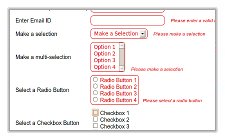
 An update of the
So we have yet another update for jQuery Live Form Validation Plugin. Its a small but important update.
An important feature which I missed out in versions 1.0 and 1.1 has been added in this version. It is a callback option which can help make AJAX callbacks or any other callbacks when the form is successfully validated.
Now we can make callbacks on successful validation.
In this example I am making an AJAX post to post.php when the form is successfully validated. For this we just need to add the following to the head section of our HTML file
I have updated the advanced demo with an alert callback.
Advanced Demo: Click Here
Download: Click Here
Project Repository: Click Here
Hope this feature helps. And many thanks to Vayu for pointing out this important feature.
80 replies on “Update for jQuery Live Form Validation Plugin”
Dear
The form validation is very good!
But I found a problem in the form validation, when I config the field using “jQuery(“#firstTrade”).validate({})” that means this filed must be validation before it submit the form. If this field is optional, that means if this field not input anything, it should not be validated, only validate when it has inputted value, how can I do this using form validation?
best wishes!
Issac
Hi Issac,
Thank you for your appreciation. I guess what you are trying to do is validate a required field. Its actually very easy instead of simply mentioning jQuery((“#firstTrade”).validate({}) just put in the following code to check if the field is empty or not.
jQuery(“#firstTrade”).validate({
expression: “if(VAL) return true; else false;”,
message: “First trade is a required field.”
});
Actually I kept this sort of a syntax to make it very flexible for validations.
GeekTantra.
Hi, GeekTantra,
Thanks for reply! Actually what I’m trying to do is not validate a required field!
The filed should not be validated when its value is empty. Only validate when it has been inputted value.
if I use the syntax:
jQuery(”#firstTrade”).validate({
expression: “if(VAL) return true; else false;”,
message: “First trade is a required field.”
});
It will always validated the filed “firstTrade”, so this result is not what I want!
I’m very appreciate for your advice!
Best wishes!
Issac
Sorry Issac, may be there is some mis-understanding. So what kind of a validation should be there when its value is input.
for this you can use the following syntax:
jQuery(”#firstTrade”).validate({
expression: “if(VAL==”something” || VAL == “”) return true; else false;”,
message: “First trade is a required field.”
});
Hi, GeekTantra,
I’m sorry for not describing clearly!
Can you add my MSN passport: [email protected] if you are free?
I have a email filed like this:
jQuery(“#email”).validate({
expression: “if (val.match(/^[^\\W][a-zA-Z0-9\\_\\-\\.]+([a-zA-Z0-9\\_\\-\\.]+)*\\@[a-zA-Z0-9_]+(\\.[a-zA-Z0-9_]+)*\\.[a-zA-Z]{2,4}$/)) return true; else return false;”,
message: “Must input valid email No.”
});
If the user not input this filed, I want the form validation not to validate this field. So, based on current syntax, the form validation always will validate it. I try your syntax, it doesn’t work, may be you can give me a sample, thanks very much!
best wishes!
Issac
In the jquery.validate.js file added the following to get it work what u want try out it works
jQuery(this).parents(“form”).submit(function(){
var x = ‘#’ + SelfID
y= $(x).val();// getting the value of the element
if( y != “”) //checking for input and validating only if it is not empty
{
validate_field(‘#’ + SelfID);
if (ValidationState == “valid”)
return true;
else
return false;
}
});
Hi Issac,
For this specific case you should use:
jQuery(“#ValidEmail”).validate({
expression: “if (VAL.match(/^[^\\W][a-zA-Z0-9\\_\\-\\.]+([a-zA-Z0-9\\_\\-\\.]+)*\\@[a-zA-Z0-9_]+(\\.[a-zA-Z0-9_]+)*\\.[a-zA-Z]{2,4}$/)) return true; else return false;”,
message: “Please enter a valid Email ID”
});
And use the latest version of jQuery Live form validation.
GeekTantra
Hi, GeekTantra,
Does this work well in your machine?
There is not any changes between the two syntax except the ID
BTW, I’m use the latest version of jQuery Live form validation.
best wishes
Issac
Please tell me what template do you use? Is it a template? Did you hire someone to fix this?
Its a template which I modified heavily.
Hi,
I like how gracefully this form degrades.
I just have one question for you.
Did you think about putting destructors in?
Say I wanted a form
to validate one way and then change
dynamically to validate another way.
Regards
Alex
Hi Alex,
Can you be a bit more specific about how you want it to work. Can you give an example situation and I will see if this can be modded to fit the situation?
GeekTantra
Hey GeekTantra,
I really like this validation script, but I was wondering if there was a way to change it so it would validate against clicks on other types of links besides just the submit button.
I am using Wizard form script (http://www.jankoatwarpspeed.com/post/2009/09/28/webform-wizard-jquery.aspx) and need it to validate the current set of inputs before being allowed to go to the next step.
is this possible without heavy modification?
Hi ThatGuy,
The modification you are saying is pretty much simple. If you open jquery.validate.js you will see a function named “validate_field(id)” there. Copy the whole function with its definition to the script on the head of your html. Now add onclick events on to the links with the action. The onclick event should call “validate_field(‘id_of_the_field_to_be_validated’)”.
Regards,
GeekTantra.
Doing that I get:
options is not defined
Error… I am calling validation up above and I am putting this in an .each() function to go through each :input in the current fieldset. I will keep toying with it. Thanks for the pointer so far!
A poorvcaitve insight! Just what we need!
2tTRYE vyaluzuwxply
Hey how to do validation for URL please its urgent
Hi pramod,
Here is a validation for URL:
jQuery(“#ValidURL”).validate({
expression: “if (VAL.match(/^(http\:\/\/[a-zA-Z0-9_\-]+(?:\.[a-zA-Z0-9_\-]+)*\.[a-zA-Z]{2,4}(?:\/[a-zA-Z0-9_]+)*(?:\/[a-zA-Z0-9_]+\.[a-zA-Z]{2,4}(?:\?[a-zA-Z0-9_]+\=[a-zA-Z0-9_]+)?)?(?:\&[a-zA-Z0-9_]+\=[a-zA-Z0-9_]+)*)$/)) return true; else return false;”,
message: “Please enter a valid URL”
});
Thank u very much Geektantra but this is not working in my code
when i had a look on the code it is just not performing in usual way in function validate_field(id) where i tried to alert validation state but nothing is poping out
but it works fine up to that step i.e it alerted id, expression but not validation state
Hi
First – great great great validation tool !
here is my problem, hope you can help.
I’m trying to validate dynamic dropbox – lets say
state and city which are created via a php script(from a Database)
The php is the one creating the select and option tags.
Jquery does not seem to see those tag after they have been created and does not
validate them
The values are 0 and still no validation.
jQuery(“#FromState”).validate({
expression: “if (VAL == ‘0’) return false; else return true;”,
message: “Please make a selection”
});
jQuery(“#FromCity”).validate({
expression: “if (VAL != ‘0’) return true; else return false;”,
message: “Please make a selection”
});
Any ideas ?
10x
Hi adjunct,
I have setup a demo for you on how to achieve the above case. Please follow this link.
https://www.geektantra.com/demos/dynamic-dropdowns/
Regards,
Geektantra
Hi,
is it possible to include umlauts (äüö) and other special characters like ß to the validation?
Regards
Colin O. Below
Hi Colin,
It depends on the character set you are using. Use UTF-8 to include such characters as ß etc. To change the charset, put this <meta http-equiv=”Content-Type” content=”text/html; charset=UTF-8″ /> in the head part of your HTML.
Regards,
GeekTantra
Hi,geektantra! you made a excellent plugin and I’m using it! here I found some problems:
1.when we are validate a email, if the invalid email is too long(I tested if over 27 charecters), the js’s efficiency will down sharply , and this caused many browser’s stop on it except safari
2. when the param live set to false, when I input three invalid field and start to correct one by one, I can’t know whether I corrected it,because they will stay wrong status untill they are all correct.
looking forward your reply!
Hi Mask,
Thank you for pointing out the problems. I will look into the performance issues of the plugin and try to replicate the second bug you have mentioned. I will get back to you as soon as possible.
Regards,
GeekTantra
Hello,
jQuery(“#postcode”).validate({
expression: “if (VAL) return true; else return false;”,
message: “Please enter Postcode”
});
postcode should start (CR or GU or KT or RG or RH) are valid
i want to do validation starting two character which show above , if its match then its fine , if doesnt match then its should give the error ….
could you tell me how could i do this validation.
starting 2 character should have validation ..
eg: CR0 2AD is valid
eg: NW1 2SE is not valid
Hi, The email validation as you kindly provided does not allow for an hyphen (“-“) within the domain name!
Here is an update to the code to allow for hyphens in the domain name part of an email address:
jQuery(“#email”).validate({
expression: “if (VAL.match(/^[^\\W][a-zA-Z0-9\\_\\-\\.]+([a-zA-Z0-9\\_\\-\\.]+)*\\@[a-zA-Z0-9_\\-]+(\\.[a-zA-Z0-9_]+)*\\.[a-zA-Z]{2,4}$/)) return true; else return false;”,
THANKS for your free code 🙂
Hi dave,
Thanks for the update. Will change it in my code.
Regards,
GeekTantra
Hi, GeekTantra.
Hi GeekTantra,
Great plugin, but I had a question regarding the callback functions. If the validation expression returns true, is it possible to execute a function? For example, I want to validate that the input entered is a valid number. If it is, I’d like to format it as currency, other wise return false. Is something like that possible?
Thanks,
Jordan
Is there any way to change this wokr with live() so that it may carry through when dynamically adding form elements etc? I was able to get it sorta working but glitchy in i.e and no submission. Tried it with the latest 1.4 jquery release. Any suggestions?
Ryan
GeekTantra,
I’ve tried using class instead of id and can’t get my validation to work. Just want to confirm that id’s must be used. Thanks…
$(“.quantity”).validate({
expression: “if (VAL != ‘0’) return true; else return false;”,
message: “Enter one or greater”
});
also tried
$(“#formID.quantity”).validate({
expression: “if (VAL != ‘0’) return true; else return false;”,
message: “Enter one or greater”
});
Yes, IDs are required. I’m looking into expanding it to support classes at the moment.
I am constantly invstigating online for tips that can assist me. Thx!
Hello,
I’m trying your validation tool and I have this message only in IE :
Out of memory at line:12
The form is well posted after I click “ok”, but I have this javascript alert message and it’s of course very annoying.
Do you know where it could come from ?
Great validation script. One of the best out there.
Upon submitting the form my confirmation page (e.g. completed.htm) loads into the same space where the form was. What setting do I change to where the completed submittal doesn’t load into the same page?
Sorry. Got it fixed. Just took off the AJAX callback.
Hi, first thanks for excellent plugin. Everthing works OK, but I have a question:
There are 2 ways a user can login: user/pass combo or smartcard/pin combo.
I’m using jQuery to hide fields depending on whether SmartCard is inserted. Is there a way to validate just visible fields?
Come to think of it:
jQuery("#ValidPassword .required").validate({
  expression: "if (VAL.length > 5 && VAL) return true; else return false;",
  message: "Please enter a valid Password"
});
would validate only field with class=”required”.
Hope someone finds this useful.
Thanks for perfect jquery validation plugin.
Your validation framework looks excellent to me, I like to know if there can be an alert/modal window instead of a message.
Your help is much appreciated.
Abdul Haq
I was wondering if plugin works with HTML5 input types such as url, email, etc?
I’ve tried changing the form input type in the demo form from text to other HTML 5 inputs such as email, url, etc and the validation still works.
Is this official? Appreciate your feedback on this and thank you in advance. 🙂
In your example the mobile number field only accepts phone numbers that start with 9 – how do you change that?
Great Work!
Thanks!
Hi GeekTantra,
I have downloaded and installed your script, and I must say its working well for me except I am trying to have jquery write the information to a database without refreshing the page, once all validation is done.
Can you assist?
Hi,
Firstly, nice work.
Buts I have a small question..
On a long form with many fields, the validation works well but is there a way to scroll the html page back to the first incorrect field?
Ssometimes the error is highlighted, but the user cant see it and the form wont submit.
I am sure its possible and very easy, for a jqueery expert. 🙂
Thanks,
TW2
Did you ever find a solution? I have the same issue.
I am also trying to accomplish this with no luck. Any suggestions from the jQuery pros?
I am also looking for a solution.
I have a long form as well, and it seems to the user the form is broken, because they are not seeing the errors.
thanks!
It seems the field validator does not work if inputs are inside a nested fieldset.
I have the following situation:
Is there a reason you can think why this field wouldn’t validate using your script’s call? I’ve removed the inner fieldset and the input validates fine but in this case I need that extra fieldset…
Never mind! I found it was conflicting with the jQuery Duplicate Field plugin.
I’m trying to figure out how to resolve the issue between Validator and Duplicate Fields plugin (any set of fields being duplicated does not validate). Has anyone else experienced this problem?
I’m trying unsuccessfully to validate a decimal. Is there some syntax I’m missing?
I tried the following:
expression: “if (VAL.match(\\.[0-9]) && VAL) return true; else return false;”
but it allows anything through, instead of limiting to numbers and a period. Any ideas?
Thanks for the great validation script.
Newbie here and just wondering if you could help me on how to validate .
I need to check if the file is pdf before submitting.
I hope you could help me with this.
Thanks in advance.
Just to add…I am using input type=file.
I quite like this script. As a relative newbie when it comes to validation, the part I’m struggling with is adapting what you already have to validate a phone number. I noticed you don’t have a sample in your already existing script.
Oops! I just realized you have a sample for “mobile” on the simple form. I never bothered to look. Sorry. Thanks, again.
I do notice another item. If you have the inline validation set to “false”, the validator does not remove the error class on the second submit. For example,
1. User hits submit w/o filling in any of the required items.
2. Error message/class is triggered on required items.
3. User fills in required elements but misses one.
4. User hits submit a second time.
5. Required fields were filled in still have the error message/class applied.
How do I go about accommodating this behavior?
I want to add a tick when someone has completed a field correctly via a css class added to the input. Can anyone advise how to do this?
Thanks
Its good but i found one issue with live validation of check-box and radio on Google Chrome 13.x.
its only working on submit button click but as live validation like text-box and text-area its not working. any solution?
with other browsers its working as expected.
Hi, nice work but i found a bug… if you wan to validate a Date between 08-01-xxxx and 09-30-xxxx take it as wrong, but if we remove 0 in month (8-01-xxxx and 9-30-xxxx) it works.
Hi,
Thank you for this awesome tool.
For it’s what i want but i have multi-steps form and i would like to check if all fields are validated on click event.
my code is like this:
//Validation goes here
$(‘#submit_first’).click(function(){
.
.
.
.
//slide steps
$(‘#first_step’).slideUp();
$(‘#second_step’).slideDown();
}
Thanks in advance.
Ops the solutions is already there.
Thanks again.
Hi, great job, how can i validate if an email was taken.
Thank you!
Great validation plugin. I got it working fast. I have one issue when it comes to the placement of the error message in the page. The message always appears to the right of the matching text field input id.
Is there anyway to change the positioning like insert the error message in a span that is somehow binded to the id of the field…. but I control where the span displays.
In other words, I want to have control of the span by absolute posistioning it somewhere next to the matching id text field (just not immediately to the right).
Thanks guys!
I spend my whole day behind testing various jQuery plugins to find out the most suitable one and I guess I have found one that is this.
Please keep updating the plugin!
hi there.. thank you very much for your coding.. it works. but
i failed to validate check box even after i ve pressed the submit button. i ve copied all your coding and i create all the css and js. still doesnt work. huhuhu.. please help me..
Hi GeekTantra,
Its such a amazing plugin that I could not wait to integrate it into my final year project.
Can you verify if the following module works. It just does not allow space to be part of the input string, despite the regular expression. I check the regular expression otherwise and it is working fine.
jQuery(“#txtName”).validate({
expression: “if (VAL.match(/^[A-Za-z\s]{3,100}$/)) return true; else return false;”,
message: “Only Alphabets allowed with minimum 3 characters”
});
How can i put a callback on a successfull validated single field at the live validation??
for example like
jQuery(‘#email’).IsValidated( function() {
// dome something, e.g. check if email already existed or something..
});
Hi, great tool. tks for sharing with us.
How about custom it to include a class after validation success?
Coach outlet offers the genuine and cheap bags at the lowest purchase!
[url=http://www.coachoutletpop.net/]コーチ[/url]
[url=http://www.coachoutletpop.net/]コーチ バッグ[/url]
[url=http://www.coachoutletpop.net/]財布 コーチ[/url]
[url=http://www.coachpursesjp.org/]コーチ[/url]
[url=http://www.coachpursesjp.org/]コーチ coach[/url]
[url=http://www.coachpursesjp.org/]コーチ バッグ[/url]
[url=http://www.coachshopjp.net/]コーチ アウトレット[/url]
[url=http://www.coachshopjp.net/]コーチ トート[/url]
[url=http://www.coachshopjp.net/]バッグ コーチ[/url]
コーチ
コーチ バッグ
財布 コーチ
コーチ
コーチ coach
コーチ バッグ
コーチ アウトレット
コーチ トート
バッグ コーチ
財布 コーチ : http://www.coachoutletpop.net/
コーチ バッグ : http://www.coachpursesjp.org/
コーチ トート : http://www.coachshopjp.net/
[url=http://www.coachoutletpop.net/]`[/url]
[url=http://www.coachoutletpop.net/]` [/url]
[url=http://www.coachoutletpop.net/] `[/url]
[url=http://www.coachpursesjp.org/]`[/url]
[url=http://www.coachpursesjp.org/]` coach[/url]
[url=http://www.coachpursesjp.org/]` [/url]
[url=http://www.coachshopjp.net/]` [/url]
[url=http://www.coachshopjp.net/]` `[/url]
[url=http://www.coachshopjp.net/] `[/url]
`
`
`
`
` coach
`
`
` `
`
` : http://www.coachoutletpop.net/
` : http://www.coachpursesjp.org/
` ` : http://www.coachshopjp.net/
There are new products including Coach Purse. It offers discount price up to 80%! Coach brand is specialty mail order site with free shipping.
I am very interested in you post. It is very helpful and useful for me. Thanks for share this valuable post.
Hello Geektantra,
I love your plugin…thank you so very much!
Questions:
1)I’m using a “RESET” button in addition to the submit button, which clears the fields, but not the error messages. How do I also clear the error messages on click of the reset button?
2)I have a radio button (Yes/No) that depending on which one you select, will display another field…Select Yes, and it displays a field for “account number”. (“No” is the default)….How do I make the “account number” field required, but only if the “Yes” radio button is selected?
Thank you for any help! 🙂
Hi!
Thanks for this great tool!!!
I have a little suggestion, or actually a question.
Is it possible to display the short error message next to the submit button?
I mean, if someone decides to leave one of the field in the long form and forget about it.
Message, that something was omitted on the very top of the form will be very helpful at the bottom of the form.
You validation is very nice, i use it in almost all my recent site. Now i have a small prob is that i want either a modile phone or a fix phone validation. Not both at time, if mob is good fix is not necessary and the same in the other way. Can i get some help?
Is there anyway to display a message when the user fills out a field correctly?
Well it does not work on viewport I juste tested it , no validation appears on iphone when in viewport then I took this line out () and it worked but I need this line as you know, any fix ?
I meant this line ..meta name=”viewport” content=”width=device-width, initial-scale=1.0…
forget all this my mistake . I kept the code in the head but it worked at the bottom … well sorry
hi i’ve tried validating 2 inputed numbers the second number should be less than or equal to the first inputed number. But whenever i input 10 then put 5 as a second number it gives me an error. i think its omitting the 0 from 10 that’s why 5 is higher than 10. How can i resolve this? please help! thanks!
jQuery(“#test_input”).validate({
expression: “if (isChecked(‘update’) && VAL != ‘0’) return true; else return false;”,
message: “Required Field”
});
is this possible only have the validation if a checkbox in the form is ticked ?